
CMS migrations rarely go exactly as planned. Even with a solid checklist and a capable team, there are a handful of mistakes that come up again and again, across almost every migration story we've come across. The good news is that most of them are avoidable once you know to look out for them.
Here are five of the most common ones, and what to do instead.
1. Not auditing your existing content first
It's tempting to just start moving content over as soon as the new platform is ready. But without a proper audit beforehand, you end up migrating everything, including outdated pages, broken links, duplicate content, and stuff nobody's looked at in years.
A migration is actually the best possible time to clean house. Go through your existing content, figure out what's still relevant, what can be merged or rewritten, and what should just be left behind. You'll end up with a smaller, more manageable migration, and a cleaner site on the other end.
2. Underestimating SEO redirects
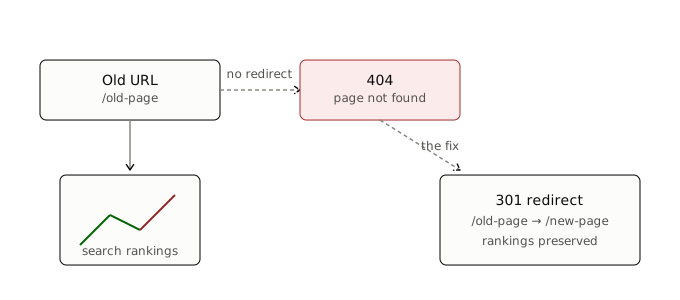
This is probably the single most damaging mistake on this list, and also one of the easiest to avoid with a bit of planning.
When your URLs change during a migration, and they almost always do, search engines need to be told where the old pages now live. Skip this step, and you'll lose organic traffic and search rankings that may have taken years to build, sometimes overnight.
Before you migrate, map out every existing URL and where it should redirect to on the new platform. Set up 301 redirects for all of them, not just your top pages. It's tedious work, but it protects everything you've already earned in search.
3. Skipping a proper testing phase
It's easy to treat the new site as "done" once the content is moved over and it visually looks right. But a lot of things can break quietly: forms that stop submitting, broken internal links, images that didn't carry over their alt text, page speed that's suddenly worse than before.
Before going live, actually test the new site the way a real visitor would. Click through every form, check mobile responsiveness, click through internal links, and run the site through a speed and SEO audit tool. Catching problems before launch is a lot less painful than catching them after your visitors do.
4. Migrating on your production domain without a staging environment
Making changes directly on your live site while migrating is a recipe for downtime, half-broken pages, and visitors landing on an unfinished site mid-migration.
Set up a staging environment, a private copy of the new site, where you can build, test, and refine everything before it ever touches your real domain. Once everything's verified and ready, you switch over in one clean move instead of leaving your live site in a messy in-between state for days or weeks.
5. Not training the team on the new platform before launch
The migration itself might go smoothly, but if your content team doesn't know how to use the new CMS, you'll end up with a slower, more error-prone few weeks right after launch, exactly when you want things running smoothly.
Give your team some hands-on time with the new platform before launch day. Walk through how to create a new post, add images, and make basic edits. A short training session upfront saves a lot of confused messages and mistakes later.
The common thread
Almost every migration mistake comes down to the same root cause: rushing the process to get to the finish line faster. Auditing content, planning redirects, testing properly, using a staging environment, and training your team all take extra time upfront. But that time is a lot cheaper than fixing a broken, traffic-losing site after the fact.
If you've been through a CMS migration yourself and hit a mistake we didn't cover here, we'd genuinely like to hear about it. Real migration stories, including the messy parts, are exactly what we want more of on this blog.