
Non-profits face a strange kind of pressure when it comes to picking a website platform. You need a site that looks credible, accepts donations reliably, tells your story well, and can be updated by staff or volunteers who probably aren't developers, all while working with a budget that's usually a fraction of what a typical business would spend on the same thing.
The good news is that some of the best CMS options for non-profits aren't expensive at all. Let's go through what actually matters for your situation, and which platforms tend to deliver the most value.
What non-profits actually need from a CMS
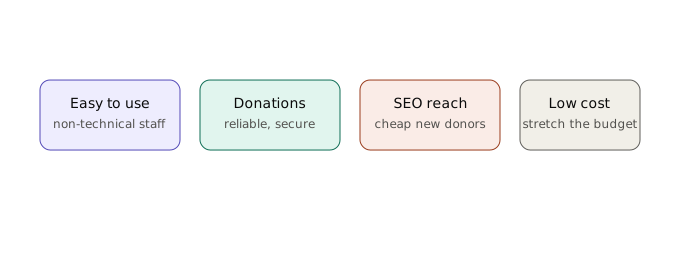
Before getting into specific platforms, it's worth being clear about what you're really optimizing for, because it's usually different from what a typical business prioritizes.
You need a platform that's easy for non-technical staff and volunteers to manage, since your team will change over time and you can't count on everyone having technical training. You need reliable, secure donation processing, since that's often the single most important function of your entire site. You need decent SEO capability, since organic search is often your cheapest way to reach new donors and volunteers. And you need low ongoing costs, since every dollar spent on web infrastructure is a dollar not going toward your mission.
With those priorities in mind, here's how the realistic options stack up.
WordPress (with the right plugins)
WordPress is free to install, and its massive plugin ecosystem includes several dedicated non-profit and donation tools, GiveWP and Charitable being two of the most popular options for accepting donations directly through your site.
The appeal here is flexibility and cost. You're not locked into a specific non-profit platform's limitations, you can build almost anything you need using widely available plugins, and hosting costs are generally low since WordPress hosting is so competitive. The tradeoff is that you'll need someone (staff, a volunteer, or an affordable freelancer) to handle setup and occasional maintenance, since WordPress does require some ongoing care, security updates, plugin updates, backups, even if you're not paying for the platform itself.
For non-profits with at least some volunteer technical support available, or a small budget to hire occasional freelance help, WordPress tends to offer the best balance of cost and capability.
Wix Nonprofits / Squarespace
Both Wix and Squarespace offer straightforward, all-in-one website builders with genuinely easy editing experiences, and both have historically offered non-profit discounts or dedicated non-profit plans worth checking directly with them, since these programs and pricing change over time.
The appeal is simplicity. If your team has zero technical background and you want the absolute lowest-effort path to a professional-looking site, these platforms hand you a lot out of the box: templates, hosting, security, and support all bundled together with no separate pieces to manage.
The tradeoff is flexibility. You're more limited in what you can customize compared to WordPress, and if your needs grow more complex over time, forms, integrations, custom donor management, you may eventually outgrow what these platforms can comfortably handle.
Dedicated non-profit CMS platforms
There are also platforms built specifically for non-profits that bundle a CMS with donor management, email marketing, and event tools all in one place. These tend to come with non-profit-specific pricing that's often free or heavily discounted for registered charities, which is worth investigating directly, since eligibility and offerings vary and change.
The appeal is that everything is built for your exact use case from the start, donation forms, donor tracking, volunteer management, without needing to stitch together separate tools. The tradeoff is generally less flexibility and a smaller pool of people who know how to customize or troubleshoot these platforms compared to something as widely used as WordPress.
What to actually prioritize when deciding
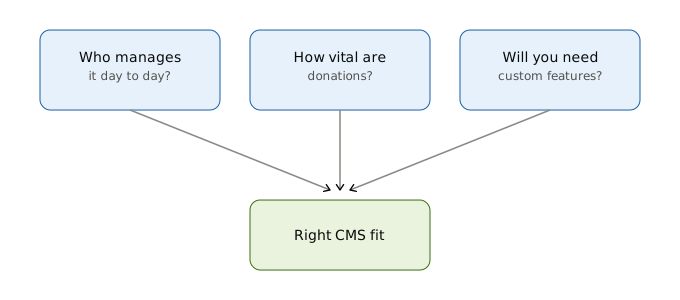
Rather than picking based on price alone, walk through these questions honestly:
Who's going to manage the site day to day, and how technical are they? If the answer is "nobody technical, ever," lean toward Wix, Squarespace, or a dedicated non-profit platform. If you have even occasional access to technical help, WordPress opens up a lot more flexibility at a lower cost.
How important is donation processing specifically? If it's central to your mission, make sure whatever platform you choose has a proven, secure, well-reviewed donation solution, not just "you can technically add a PayPal button."
Do you expect to need custom functionality down the line, event registration, volunteer sign-ups, membership areas? If so, weigh how easily each platform can grow with you before committing.
The honest bottom line
There's no single "best" CMS for non-profits, the same way there isn't one for businesses. But the good news is that budget doesn't have to mean a poor website. WordPress paired with the right plugins remains one of the most cost-effective, flexible options available if you have any access to technical support at all. If you genuinely have none, a simpler builder or dedicated non-profit platform will save you from getting stuck.
Whatever you choose, the platform matters less than making sure it actually gets set up properly and maintained over time. A well-configured budget platform will always outperform an expensive one that nobody's updating.
If your organization has gone through this decision, or migrated between platforms as your needs grew, we'd love to hear how it went. Real non-profit experiences are exactly the kind of practical insight that's hard to find in generic CMS comparisons.