
If you've read our last post explaining what a headless CMS actually is, you already have the basic idea. This time we're going to put the two approaches side by side and look at where they genuinely differ, because "different" can mean a lot of things, and most comparisons online either oversimplify it or bury you in technical jargon.
Let's go through the real differences one at a time.
How content and design are connected
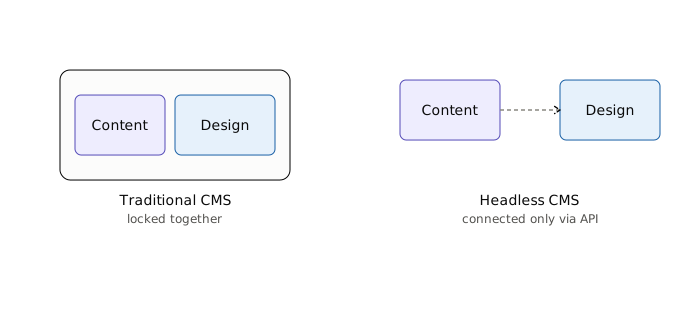
This is the core difference, and everything else kind of flows from it.
In a traditional CMS, your content and your website's design live in the same system. When you write a blog post in WordPress, for example, the platform is also responsible for turning that post into an actual webpage, using whatever theme you have installed. Change the theme, and the whole look of your site changes instantly, without touching the content itself.
A headless CMS splits these two things apart completely. The CMS becomes purely a place to store and organize content. It has no opinion on how that content should look. Instead, it hands the content off through an API to whatever front end is requesting it, and that front end decides everything about layout, styling, and presentation.
Neither approach is "wrong." They're just built around different assumptions about who's using the system and how.
Who ends up doing the work
This is where the differences start to really matter in day-to-day use.
With a traditional CMS, a lot of the front-end work is already done for you. Pick a theme, customize a few settings, maybe hire someone to tweak the design, and you're up and running. Non-technical team members can usually manage most of the day-to-day content updates without needing a developer involved every time.
With a headless CMS, there's no theme system doing that work for you. Someone (usually a developer) has to build the entire front end from scratch, deciding how every piece of content gets displayed. That gives a lot more creative and technical freedom, but it also means you can't just spin up a site without development resources. For a small business without a technical team, this alone is often the deciding factor.
Where the content actually goes
A traditional CMS assumes there's basically one destination for your content: your website. That's what it's built and optimized for.
A headless CMS assumes there might be several destinations. The same product description, for example, could get pulled into your website, a mobile app, a kiosk in a physical store, or even a voice assistant, all from one central source. If you're only ever publishing to a single website, this advantage doesn't really apply to you. But if you're managing content across multiple platforms already, this is usually the single biggest reason businesses switch to headless.
Setup time and ongoing cost
Traditional CMS platforms are generally faster and cheaper to get off the ground. Install it, pick a theme, customize, launch. The ecosystem of themes, plugins, and tutorials is enormous, so there's rarely a need to build things from zero.
Headless setups usually take longer and cost more upfront, mainly because of that front-end development work we mentioned earlier. There's also ongoing maintenance to think about, since you're maintaining two separate systems (the CMS backend and the custom front end) instead of one bundled platform. That said, some businesses find the long-term flexibility worth the higher initial investment, especially if their content needs are complex or multi-channel.
Performance and flexibility
This one's a bit more nuanced. Headless sites can often be faster, since the front end isn't carrying the extra weight that a lot of traditional CMS platforms bundle in by default. Developers also have more freedom to use modern front-end frameworks and build exactly what they want, without being boxed into a theme's structure.
But "can be faster" doesn't mean "automatically is faster." A poorly built headless front end can be just as slow as a bloated traditional site. The advantage is really about flexibility and ceiling, not a guarantee.
So which one should you actually pick?
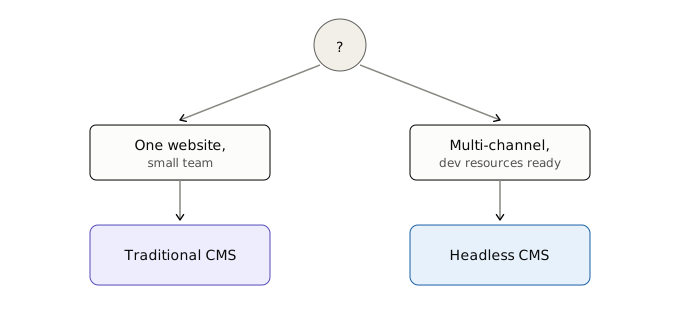
Honestly, it comes down to two questions. First, do you need to publish the same content across multiple platforms, not just one website? And second, do you have (or are you willing to pay for) the development resources to build and maintain a custom front end?
If the answer to both is yes, headless is probably worth the investment. If you're running a single website with a small team and don't have complex multi-channel needs, a traditional CMS is very likely the simpler, more cost-effective choice, and there's nothing wrong with sticking to it.
We'll be covering specific platform comparisons in upcoming posts, including some hands-on migration stories from businesses that made the jump one way or the other. If you've been through this decision yourself and want to share what you learned, we'd genuinely like to hear about it.