
Ask five different agencies how much a CMS migration costs, and you'll probably get five very different answers. That's not because anyone's lying to you, it's because "migration" can mean wildly different things depending on the size of your site, the platforms involved, and how much you're willing to do yourself versus hand off to someone else.
Instead of throwing out a single number that won't actually apply to your situation, let's walk through what actually drives the cost, so you can build a realistic estimate for your own project.
The size and complexity of your existing content
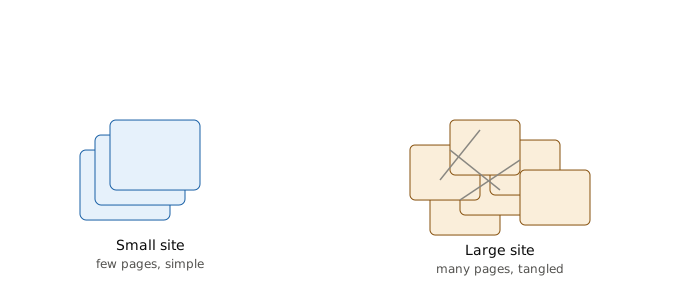
This is usually the single biggest cost driver, and it's often underestimated at the start.
A five-page brochure site with a handful of blog posts is a completely different job from a 5,000-page publisher with years of accumulated content, custom fields, and complex taxonomies. Every piece of content needs to be mapped, exported, cleaned up, and imported into the new system, and that work scales directly with how much content you have and how messy it currently is.
If your content has been neglected for years, outdated pages, duplicate content, broken internal links, expect to spend real time (and therefore money) auditing and cleaning it up before or during the migration. This is also, honestly, the best opportunity to do that cleanup, since you're already touching everything anyway.
Custom functionality and integrations
If your current site is a fairly standard setup using common plugins or modules, migrating it is relatively straightforward. But if you've built custom functionality over the years, a custom booking system, specific integrations with your CRM or email platform, custom user roles and permissions, all of that needs to be rebuilt or reconfigured on the new platform, and that's where costs can climb quickly.
Before budgeting for a migration, make a full list of every third-party integration and custom feature your current site relies on. Each one needs to be accounted for individually, since "just move the content" and "rebuild our entire booking and payment system" are very different scopes of work.
Design and front-end development
Are you keeping your current design, or building something new during the migration? Reusing an existing design (adapted to fit the new platform) is generally cheaper and faster than a full redesign happening at the same time.
A lot of businesses do choose to redesign during a migration, since they're already disrupting the site anyway, but it's worth being honest with yourself about whether you're budgeting for a migration or a migration plus a full redesign, because those are two different projects bundled together, and the combined cost adds up fast.
Developer time and expertise required
This connects directly back to which platforms are involved. Migrating between two popular, well-documented platforms with a lot of available developer talent (like WordPress to another WordPress-adjacent setup) is generally cheaper than migrating to or from a more specialized platform where developer expertise is scarcer and more expensive, Drupal or a headless CMS setup, for example.
Freelancers and small agencies will typically cost less than larger, established agencies, but there's a real tradeoff in terms of experience, reliability, and how well they handle unexpected issues that come up mid-migration, and issues almost always come up.
SEO work and redirect mapping
This part is easy to underestimate, but it directly protects revenue and traffic you've already earned, so it's not somewhere to cut corners.
Every existing URL needs to be mapped to its new location and set up with a proper redirect. For a small site, this might be a few hours of work. For a large site with thousands of indexed pages, this can be a significant, dedicated piece of the project on its own, sometimes requiring specialized SEO expertise beyond general development work.
Testing, QA, and post-launch support
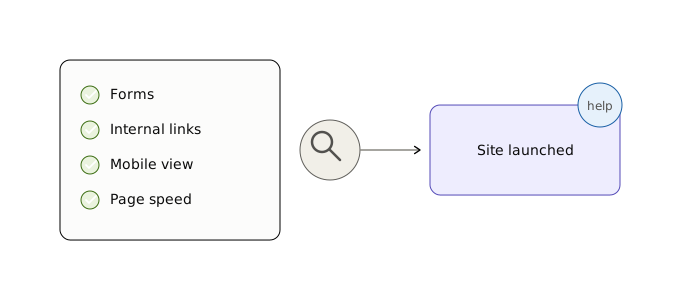
A rushed migration that skips proper testing tends to cost more in the long run, through broken pages, lost conversions, and emergency fixes after launch, than it would have cost to test properly beforehand.
Budget for a real testing phase: checking every form, every internal link, mobile responsiveness, page speed, and a proper QA pass before going live. It's also worth budgeting for some post-launch support time, since issues often surface once real traffic starts hitting the new site in ways staging environments don't always catch.
So, what's a realistic range?
Here's the honest, unsatisfying truth: it genuinely depends on all of the factors above. A small business website with straightforward content and no custom functionality might migrate for a few hundred to a couple thousand dollars if you're working with a freelancer and doing some of the legwork yourself. A mid-sized business site with custom integrations and a redesign bundled in could run into the five figures. A large enterprise migration with complex content, custom development, and dedicated SEO work can run considerably higher than that.
Rather than chasing a single number, the more useful exercise is going through each of the factors above for your specific site, and getting quotes from a couple of developers or agencies once you actually know the scope. Anyone who gives you a confident number without asking about your content volume, integrations, and design plans first is probably guessing.
If you've been through a CMS migration and want to share what it actually ended up costing, and what drove that cost, we'd love to feature your story. Real numbers from real projects are exactly the kind of information that's hard to find elsewhere.