
If you're still running Strapi v4, it's worth paying attention to the calendar. Strapi has said v4 will only receive security updates until April 2026, which means if you're reading this after that point, you're already running a version that's no longer getting security patches. That alone is a good enough reason to start planning your move to v5, even if nothing on your current site feels broken.
The good news is that Strapi has put together a genuinely structured migration path, including an upgrade tool that automates a good chunk of the work. Here's what actually changes, and what to expect going through it.
The API response format is the biggest change
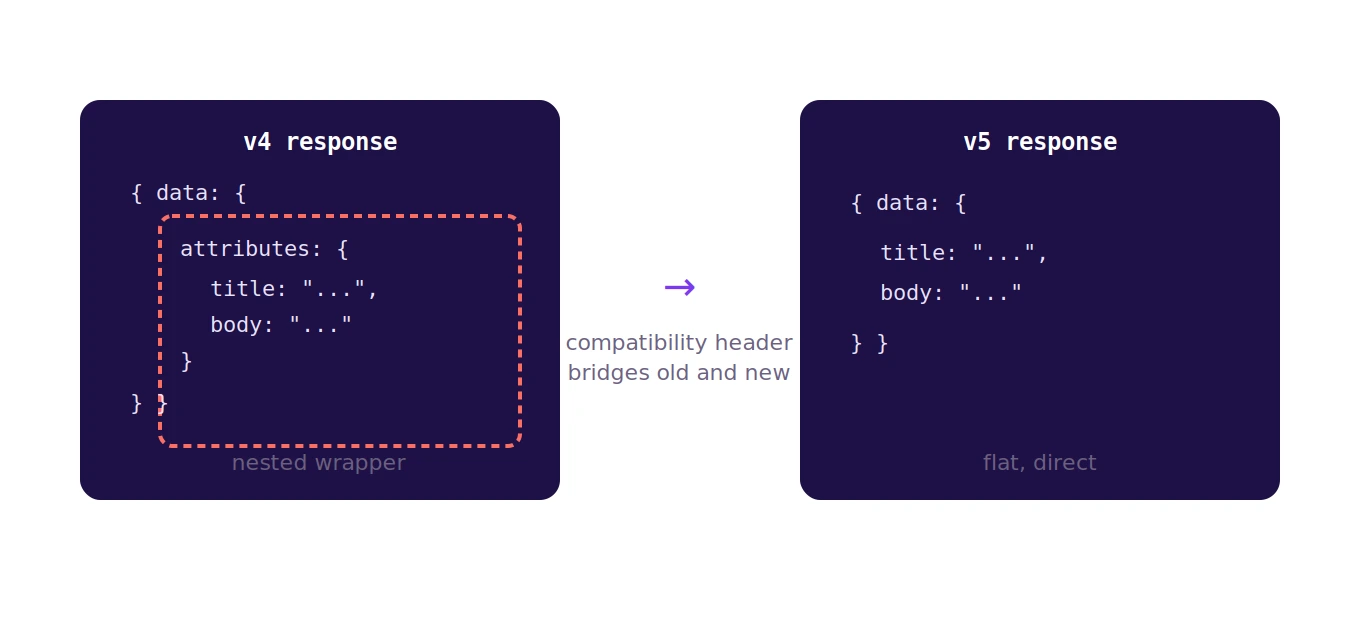
If there's one change that will actually touch your code, it's this one. In Strapi v4, API responses wrapped your content fields inside a data.attributes structure. Strapi 5 changes this response format, removing that attributes wrapping, so your data comes back in a flatter, more direct shape.
If you've got a frontend application consuming your Strapi API, and you almost certainly do, this means updating how your code reads the response data. The good news is Strapi didn't just flip a switch and break everyone overnight. Strapi 5 lets you request the old v4 response format using a special compatibility header, which gives you room to migrate your frontend code gradually instead of needing everything updated the moment you upgrade the backend.
The default bundler has changed
This one's more of a behind-the-scenes shift, but worth knowing if you've customized your admin panel build process. Webpack was the default bundler in Strapi v4, and Vite is now the default in Strapi 5. If you have custom webpack configurations for your admin panel, you'll need to convert them to Vite configurations, or you can pass a flag to keep using webpack temporarily, though you'll see a warning nudging you toward Vite eventually.
For most projects that haven't heavily customized the admin build process, this change won't require much action beyond letting the upgrade tool handle it.
Database requirements have tightened
A few database-related changes are worth checking before you upgrade, especially if you're running an older setup. MySQL v5 is no longer supported in Strapi 5, with MySQL v8 now the minimum required version. If you're still on MySQL 5 for any reason, that's a prerequisite to sort out before the Strapi upgrade itself. Similarly, Strapi has narrowed which database drivers it supports, only specific packages are supported for SQLite and MySQL connections going forward, so it's worth checking your current setup against Strapi's current documentation before starting.
The admin panel design system got a real overhaul
Strapi 5 comes with a significantly reworked design system for the admin interface, focused on better accessibility and more consistent components. Part of this includes a base font-size change in the app, which is a small detail but can matter if you've built custom admin panel extensions that assumed the old sizing. If you maintain any custom plugins or admin customizations, this is one area worth testing carefully after the upgrade rather than assuming everything will look and behave identically.
Plugins need their own attention
Don't assume every plugin you're currently using will just work after the core upgrade. Since the response format, admin design system, and other underlying pieces have changed, plugin authors have had to update their own plugins to stay compatible with v5. Before migrating, it's worth checking each plugin you rely on for its own v5 compatibility notes, and planning to update to the v5-compatible version of each one alongside your core Strapi upgrade, rather than assuming it's a single, isolated step.
The upgrade tool does real work for you
Strapi provides an official upgrade CLI tool that handles a meaningful portion of this migration automatically through what they call codemods, automated code transformations that handle specific breaking changes for you. Not every change is covered this way, some require manual updates on your part, but it's worth running the tool and letting it handle what it can before diving into manual fixes. You can see the full list of what the tool can automate directly from the command line, which is a good first step before you start planning the manual portion of the work.
How to actually approach this migration
Rather than treating this as a single, all-at-once switch, the more realistic approach is to start by reading through Strapi's breaking changes documentation properly, since it's organized clearly by category, database, dependencies, configuration, and API changes, with notes on what affects plugins and what the upgrade tool can handle automatically. Run the official upgrade tool on a test or staging environment first, never directly on production. Use the compatibility header to keep your frontend working temporarily while you update it at your own pace, rather than needing frontend and backend changes to land in the same moment. And test thoroughly, particularly around any custom plugins, admin customizations, or database configuration, since those are the areas most likely to need manual attention.
The bottom line
This isn't a trivial, five-minute update, but it's also not a full rebuild. Strapi has clearly put effort into making this migration manageable, with automated tooling and backward-compatibility options that most major version upgrades don't bother offering. Given that v4 is heading toward the end of its support window, this is a migration worth planning for deliberately rather than putting off indefinitely.
If you've already made the move from v4 to v5, we'd genuinely like to hear how it went, what the upgrade tool handled well, what still needed manual work, and anything you wish you'd known going in. Real migration experiences like that are exactly the kind of content we want more of on this blog.