
If you've spent any time reading about website platforms lately, you've probably run into the term "headless CMS" more than once. It sounds a bit dramatic, maybe even a little technical and intimidating. But the idea behind it is actually pretty simple once you strip away the jargon.
Let's break it down properly.
First, what is a regular CMS?
Before headless makes sense, it helps to think about what a normal, traditional CMS actually does. Platforms like WordPress or Drupal, in their standard setup, do two jobs at once:
They store your content (your blog posts, pages, images, product listings, whatever it may be), and they also decide how that content looks and gets displayed on your website. The backend where you write and manage content, and the front end that visitors actually see in their browser, are bundled together as one system.
That's why, when you install a WordPress theme, your whole site's look changes instantly. The content and the presentation are tightly connected.
So what does "headless" actually mean?
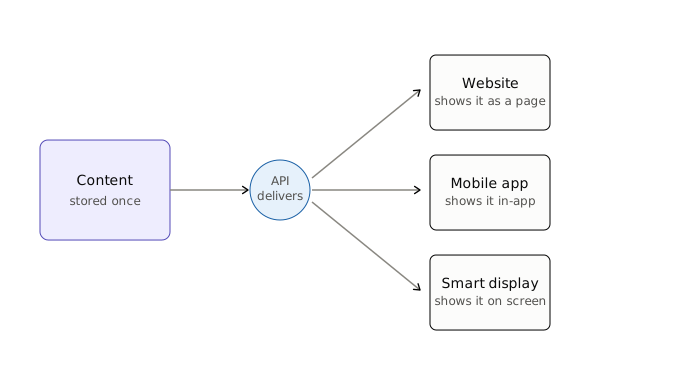
A headless CMS takes that front end (the "head") and removes it entirely. What's left is just the backend: a place to create, organize, and store your content. Instead of the CMS deciding how that content is displayed, it simply hands the content off through something called an API whenever it's needed.
Think of an API like a waiter. Your content sits in the kitchen (the CMS), and whenever a website, an app, or some other device wants that content, the API goes and fetches it and brings it out. What happens with that content once it arrives, how it's styled, laid out, or displayed, is completely up to whatever's requesting it.
This means the same piece of content stored in your headless CMS could show up on your website, inside a mobile app, on a smart display in a store, or anywhere else, all pulling from the exact same source, but each one presenting it however it wants.
Why would anyone want that?
Here's where it starts to make more sense in practice.
If you only ever publish content to one website, a traditional CMS is probably all you need. There's no real advantage to separating things that don't need separating.
But a lot of businesses today aren't just running one website. They might have a website, a mobile app, maybe a few smart devices or kiosks, and they want the same product information or content showing up consistently across all of them. Managing that content separately in each place would be a nightmare. A headless CMS lets you manage it once and push it out everywhere.
There's also the flexibility angle. With a traditional CMS, your front end is often somewhat tied to what the platform supports. With headless, developers can build the front end using whatever tools or frameworks they prefer, without being boxed in by the CMS's own templating system.
And then there's speed. Headless setups can sometimes lead to faster-loading websites, since the front end can be built and optimized independently, without carrying along all the extra weight a traditional CMS sometimes bundles in.
It's not automatically the better choice, though
This is the part a lot of headless CMS marketing tends to gloss over. Going headless isn't free of tradeoffs.
You'll generally need developers involved to build and maintain that front end, since there's no built-in theme system doing it for you. For a small business without in-house technical resources, that can turn something simple into something that requires ongoing developer support. It also tends to take longer and cost more to get an initial site up and running compared to picking a theme on a traditional CMS and customizing from there.
If you're a small business with one website and a small team managing content, a traditional CMS is often still the more practical, budget-friendly choice. Headless tends to earn its cost when you actually have that multi-channel need, or when you have specific front-end requirements a traditional CMS can't easily support.
A simple way to think about it
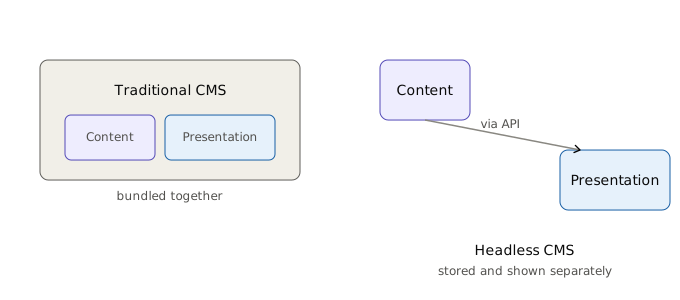
Traditional CMS: content and presentation live together, easier to set up, less flexible.
Headless CMS: content lives on its own, more setup and technical involvement required, but far more flexible about where and how that content shows up.
Neither one is universally "better." It really comes down to what you're building, who's going to manage it, and how many places that content needs to end up.
If you're currently trying to decide between the two for your own project, that's exactly the kind of decision we like digging into on this blog. We'll be covering specific headless CMS platforms and real comparisons in future posts, so if this is something you're actively weighing, keep an eye out.